Quotes
A Quote is a priced offer you send to a customer. It lists the products, quantities and unit prices, the customer contact, the shipping and billing addresses, payment terms and an expiration date. When the customer approves it, you convert it into a Sales Order.
Quotes live in the sidebar under Commerce, next to Product Catalog, Sales Orders and Invoices. You need the Quotes: Read permission to see them.
The Quotes list
Section titled “The Quotes list”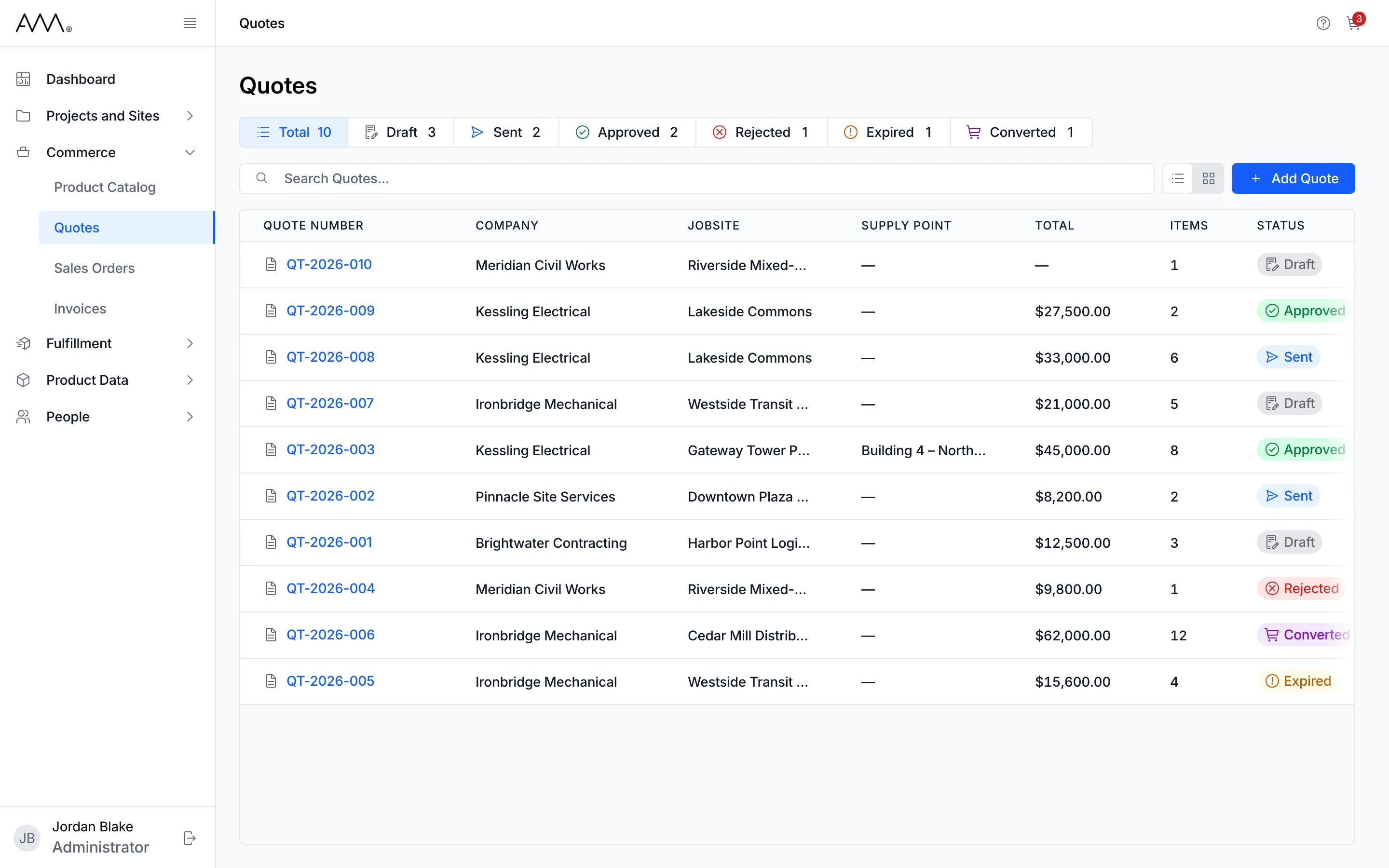
The list shows one row per quote: Quote Number, Company, Jobsite, Supply Point, Total, Items, Status, Created, Expires in and Created by.
- The status buttons across the top (Total, Draft, Sent, Approved, Rejected, Expired, Converted) show a count each. Click one or more to filter the list; Total clears the filter.
- Search Quotes… matches the quote number or the contact name, which is not a column.
- Click a column heading to sort by it, and again to reverse the order. Every column except Items sorts. The list opens newest first.
- The toggle on the right switches between List view and Card view.
Filter, search and sort are part of the page address, so a bookmark or a shared link reproduces the same view.
Expires in counts down the days to the expiration date, turns amber at three days and shows Expired in red once the date has passed. It is blank for Approved, Rejected and Converted quotes, and it is separate from the status badge: a Sent quote whose date has passed still shows Sent.
Add Quote does not open a form. It takes you to the Product Catalog, because a quote starts from the cart. See Create a quote from the cart.
A quote’s page
Section titled “A quote’s page”Click a quote number to open it. The header shows the number, the status badge and who created it. On the right sit the buttons for the quote’s status, such as Send to Customer, and an Actions menu with Edit, Add More Products and, on a Sent quote, Resend. Two tabs sit below:
- Details: cards for Project Details (Company, Jobsite, Supply Point), Shipping Address, Billing Address, Customer Details (Contact Name, Phone Number, Email, Additional Recipients) and Quote Details (Expiration Date, Customer PO, Payment Terms, Estimated Lead Time, Notes, Terms & Conditions).
- Items: the line items with quantity, unit price and line total, and the Quote Summary with Subtotal, Tax, Shipping and Total.
Draft and Sent quotes are edited in place: Actions > Edit replaces the tabs with a form. See Edit a quote.
Lifecycle
Section titled “Lifecycle”| Status | What it means | Actions available |
|---|---|---|
| Draft | Being prepared. Not yet sent to the customer. | Send to Customer; Actions > Edit, Add More Products; add cart items from the Shopping Cart |
| Sent | Emailed to the customer with a PDF copy. Waiting for a decision. | Mark Approved, Mark Rejected; Actions > Edit, Add More Products, Resend; add cart items |
| Approved | The customer accepted the quote. | Convert to Sales Order |
| Rejected | The customer declined the quote. | Duplicate and revise |
| Expired | The quote passed its expiration date. | Renew Quote |
| Converted | A sales order was created from the quote. Read-only. | None. The header links to the sales order. |
Duplicate and Renew both create a new Draft copy. Converting is the end of a quote’s life: a Converted quote cannot be edited, sent or converted again. The reference lists the permission behind each action.
How quotes relate to other records
Section titled “How quotes relate to other records”- Shopping Cart: every quote starts as cart items, either as a new quote or appended to a Draft or Sent quote. See Catalog and cart.
- Company, Jobsite and Supply Point: optional pickers whose lists narrow to fit each other. See Pick the company, jobsite and supply point, Companies, Jobsites and Supply Points.
- Price List: a quote uses Catalog Pricing unless its company has an Active Price List. See Apply a company’s price list and Price Lists.
- Sales Order: converting an Approved quote copies it into a new Sales Order and emails the customer the Order Confirmation. See Sales Orders.
How-tos
Section titled “How-tos”- Find a quote
- Create a quote from the cart
- Add cart items to an existing quote
- Edit a quote
- Pick the company, jobsite and supply point
- Save or discard unsaved changes
- Apply a company’s price list
- Send a quote to the customer
- Approve or reject a quote
- Convert a quote to a sales order
- Duplicate or renew a quote
- Quote fields, statuses and permissions