Products (PIM)
Products (PIM) is where AWM keeps its product master data: names, SKUs, UPCs, manufacturers, vendors, costs, prices, units and dimensions. Every product is one row in a single grid, and every field is a cell you change in place. There is no separate product page.
You find it in the sidebar under Product Data, as Products (PIM). The page is titled Product Information Management. You need the Products PIM: Read permission to open it. The read-only Product Catalog and Price Lists draw on the same products.
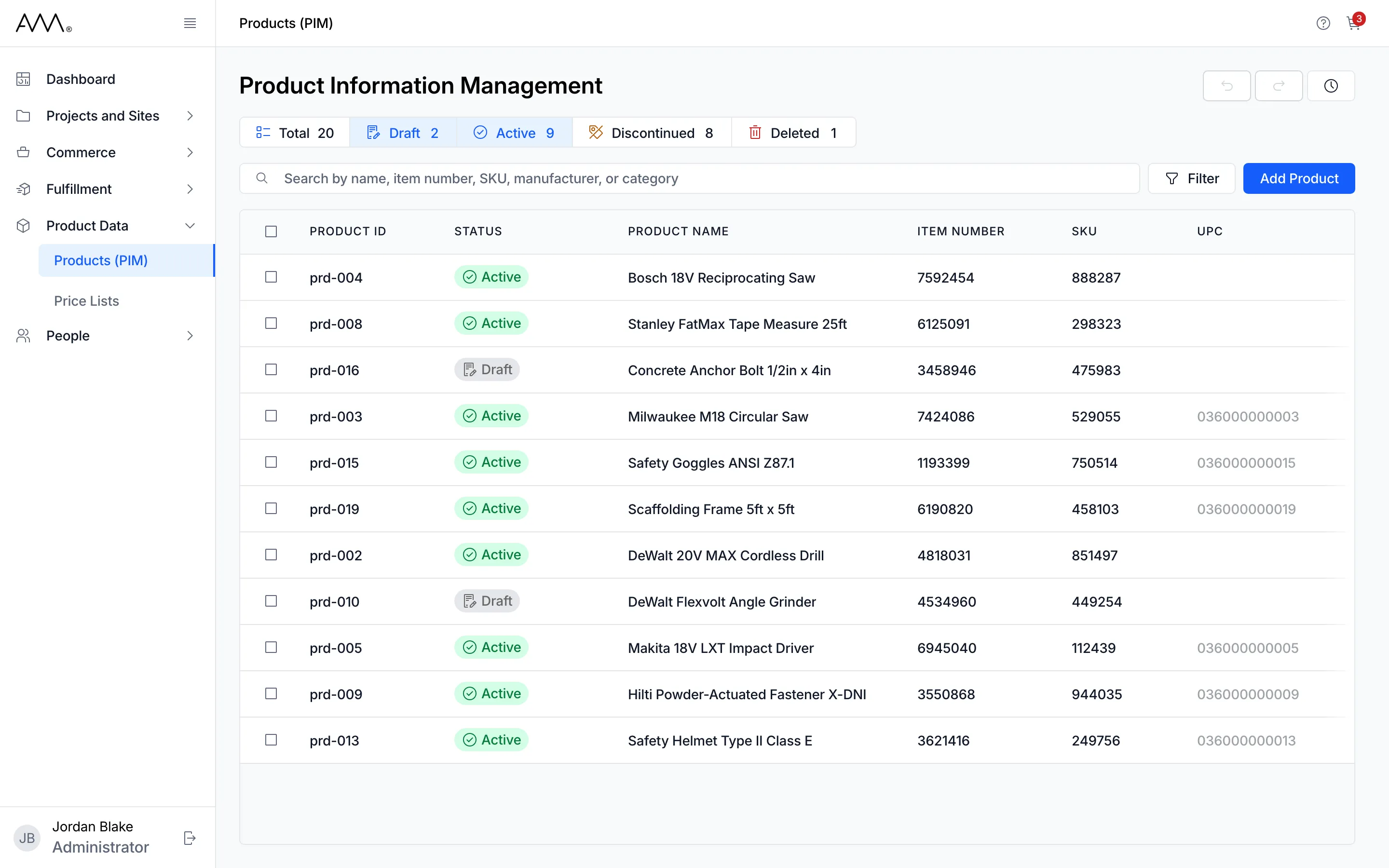
Above the grid
Section titled “Above the grid”- Status chips: Total, Draft, Active, Discontinued and Deleted, each with a count of all products in that status. Click chips to add or remove statuses. By default Draft and Active are selected; Total shows everything, including deleted products. The counts cover all products and do not change when you search or filter.
- Search: a box labelled Search by name, item number, SKU, manufacturer, or category, with a Clear button once it has text.
- Filter: opens a panel with Manufacturer, Category and Vendor lists and List Price, Vendor Cost and Lead Time (days) ranges with Min and Max boxes.
- Add Product: opens a new row at the top of the grid, even when the grid is empty.
- Active filter chips: each search term and filter shows as a chip such as Search: saw or Category: Tool with an x to remove it, followed by Clear Filters.
- Undo, Redo and History buttons at the top right. Undo and redo also answer to Ctrl+Z and Ctrl+Shift+Z (Cmd on a Mac) while you are not typing in a cell.
The grid
Section titled “The grid”PRODUCT ID stays pinned on the left as you scroll sideways. After it come STATUS, PRODUCT NAME, ITEM NUMBER, SKU, UPC, MANUFACTURER, CATEGORY, VENDOR, VENDOR PART #, VENDOR COST (USD), LEAD TIME, LIST PRICE (USD), UNIT OF MEASURE, GROSS WEIGHT (LB), WIDTH (IN), HEIGHT (IN), DEPTH (IN), SHORT DESCRIPTION, LONG DESCRIPTION, KEY SPECIFICATIONS, then the read-only LAST UPDATED and UPDATED BY, and a clock icon that opens the product’s history. Click any header to sort. A row flashes green for a few seconds after it saves, and a change that is rejected shows as an error message. UPC is the one cell you set once: after that it is read-only. When nothing matches, the grid shows No Results Found and Check the spelling or try removing filters. See the Products reference for every column.
Selecting rows
Section titled “Selecting rows”Tick the checkbox at the start of a row (or the one in the header for all visible rows) and the toolbar becomes a banner: 2 Selected, the hint Edit any cell to apply the change to all selected rows, a Clear button and a red Delete Products button. The filter panel closes while rows are selected.
Statuses
Section titled “Statuses”| Status | What Omni does with it |
|---|---|
| Draft | Where new products start. Shown by default. |
| Active | Shown by default. |
| Discontinued | Hidden until you select Discontinued or Total. |
| Deleted | Set by Delete Products. Hidden until you select Deleted or Total. A deleted product can still be edited, including its status. |
Any status can be changed to any other, directly in the STATUS cell.