Companies
A Company is an organization you work with: a contractor, a hardware owner or a manufacturer. People, projects, jobsites, supply points, quotes and sales orders are linked to a company, so most records in Omni point back to one.
Where to find it
Section titled “Where to find it”In the sidebar, open Projects and Sites and choose Companies. You need the Companies: Read permission to see the entry.
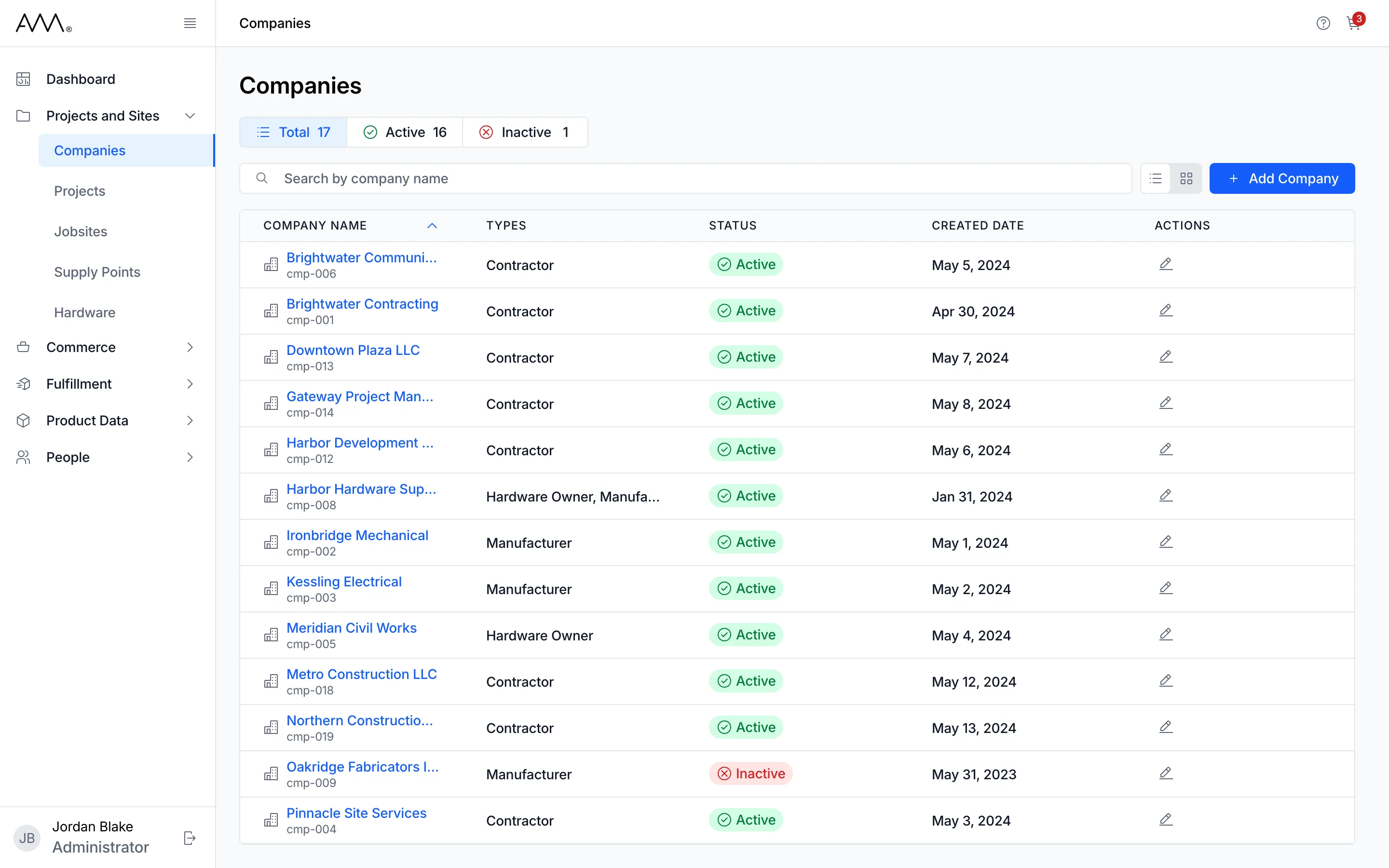
The Companies list
Section titled “The Companies list”The list shows every company, active or inactive, sorted by Company Name. Each row shows:
- Company Name, with the company’s identifier underneath. Click the name to open the company.
- Types: one or more of Contractor, Hardware Owner and Manufacturer.
- Status: Active or Inactive.
- Created Date.
- Actions: an edit icon, shown when you can edit companies.
Above the list:
- The Total, Active and Inactive buttons show counts and filter the list by status. You can select more than one status. Total clears the selection.
- Search by company name narrows the list as you type.
- The List view and Card view buttons switch between a table and cards. Omni remembers your choice.
- Add Company opens the form for a new company.
Click the Company Name, Status or Created Date heading to sort by it. The list loads more rows as you scroll. If nothing matches, it shows No companies found.
The company page
Section titled “The company page”Opening a company shows its name, status and identifier in the header, with an Edit button on the right. Two tabs sit below:
- Overview has two cards. Details shows the company’s Types and Created Date. Addresses shows each address under its type (Corporate, Billing or Shipping), or No addresses found.
- People lists the people linked to the company and lets you add one. You need the Users: Read permission to see this tab.
Statuses
Section titled “Statuses”| Status | Meaning |
|---|---|
| Active | Offered when you choose a company for a person, project, jobsite, supply point, quote or sales order. New companies start here unless you choose otherwise. |
| Inactive | Kept, with its people and history, but not offered when you choose a company in a new record. It can still be edited and set back to Active. |
You set the status in the Status field when you add or edit a company. A company you delete is removed from the list and the counts. People who were linked to it show (Deleted) before the company name.
How-tos
Section titled “How-tos”- Find and open a company
- Add a company
- Edit a company
- Manage a company’s people
- Delete a company
- Companies reference